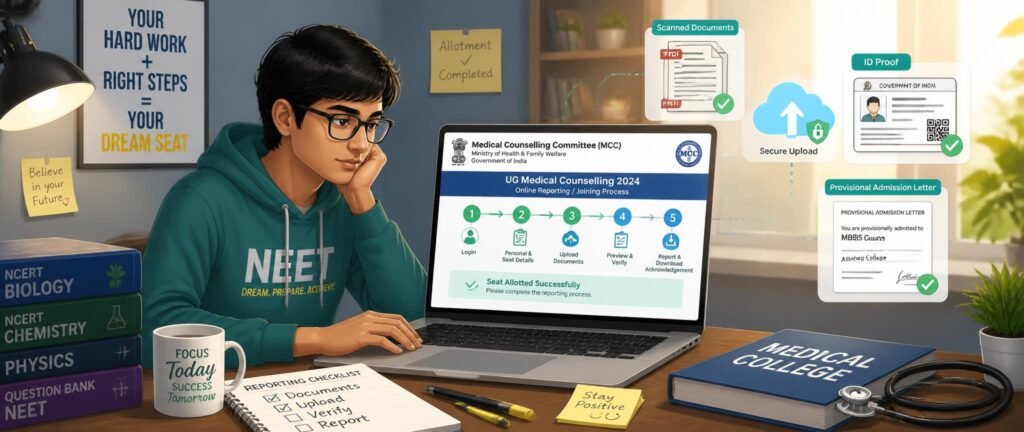
Getting a seat allotted is only half the job — confirming it is where students trip up. This year, the NEET 2026 online reporting process replaces the old scramble of travelling to a college with document uploads on the MCC portal, done from your laptop. But the rule has a twist most candidates miss: uploading online is mandatory for everyone, while only Float candidates skip the campus visit entirely.
If your allotment is out, this guide walks you through the exact online steps, the documents to keep ready, and what happens after you upload. Before you begin, confirm your Round 1 result so you know exactly which college and course you are reporting for.
Table of Contents
What the NEET 2026 Online Reporting Process Is
After each seat allotment, MCC requires every allotted candidate — both Freeze and Float — to upload clear scanned copies of their documents on mcc.nic.in within the reporting window. The allotted institute then verifies them online. This mandatory online document upload is the biggest procedural change this cycle, and it is the first step for all candidates before anything else happens.
Where candidates differ is what comes next, which is decided by how freezing and floating differ. The NEET 2026 online reporting process is identical for both at the upload stage — the paths split only after verification.
Who Reports Online and Who Also Reports in Person
Both categories upload online, but the finish line is different:
- Float candidates (seeking upgradation): Upload documents, get them verified online, and receive a provisional confirmation. No physical visit is needed at this stage — you stay eligible for a better seat in the next counselling round.
- Freeze candidates (accepting the seat): Upload documents online too, but then must physically report to the allotted institute for original document verification and admission fee payment to finalise the seat.
So online reporting is universal; physical reporting is only for those locking in their seat. Choosing Freeze commits you to the physical reporting step, so decide deliberately.
Step-by-Step: How to Report Online
Here is the exact NEET 2026 online reporting process on the MCC portal:
- Log in — Sign in at mcc.nic.in using the same mobile number and email ID you used during registration.
- Download your allotment — Download the seat allotment letter to confirm your allotted college and course.
- Choose Freeze or Float — Submit your willingness: Freeze to accept, Float to stay in the running for an upgrade.
- Upload documents — Upload clear scanned copies of every required document in the specified format and size.
- Wait for verification — The allotted institute’s Document Verification Committee checks your uploads online.
- Respond to any query — If the committee flags a discrepancy, re-upload corrected files within the reporting window.
- Download confirmation — Once cleared, download your provisional admission letter as proof.
If the portal throws payment, OTP, or login trouble mid-process, our guide to common portal error fixes will save you time. Never leave uploads for the last hour, since the reporting windows are firm and MCC does not extend them.
Documents You Need to Upload
Keep these scanned, clearly named, and stored in one folder before your result drops:
- NEET UG 2026 admit card and scorecard
- Seat allotment letter from mcc.nic.in
- Class 10 certificate (as date-of-birth proof)
- Class 12 marksheet and passing certificate
- Photo ID proof (Aadhaar/passport)
- Passport-size photographs
- Category certificate (SC/ST/OBC-NCL/EWS), if applicable
- PwD certificate from a designated centre, if applicable
Upload only on the official MCC portal, and use the same identity documents throughout — a mismatch between your uploads and your registration details is an instant red flag at verification.
After You Upload: What Happens Next
Once your documents pass online verification, Float candidates receive a provisional confirmation and remain eligible for the next round, while Freeze candidates move on to physical reporting to complete admission. If discrepancies remain unresolved, the allotted seat can be cancelled — so the online step carries the same weight as an in-person check ever did.
Remember that seat upgradation through Float runs only up to Round 3. After that, everyone holding a seat reports physically, so use the online convenience while it lasts and plan your next move accordingly.
Common Mistakes to Avoid
Because verification is digital, the quality of your files decides everything. Blurred scans, cropped edges, and unreadable stamps are the most common reasons uploads get rejected.
Before you submit, open every file and check it is sharp, shows full document borders, and has legible seals and signatures. Respond to any verification query the same day rather than waiting, and never assume the deadline will move — it will not. A single missed correction window can undo a seat you had already earned.
Final Tips Before You Report
Treat the NEET 2026 online reporting process as seriously as an exam: prepare documents in advance, log in early, and double-check every upload before submitting. Decide Freeze or Float on strategy, not on which one feels easier, and keep your provisional admission letter safe once you have it.
Done right, online reporting turns days of travel into a few careful minutes on the portal. Understand the steps, respect the deadlines, and you confirm your seat without ever leaving your desk.
FAQ Section
Q: What is the NEET 2026 online reporting process? A: It is the mandatory step where every allotted candidate uploads scanned documents on the MCC portal after seat allotment, and the allotted institute verifies them online. Float candidates finish here, while Freeze candidates also report physically to finalise admission.
Q: Do Freeze candidates also have to report online? A: Yes. Both Freeze and Float candidates must upload their documents online within the reporting window. Freeze candidates then additionally report in person for original verification and fee payment, while Float candidates do not.
Q: What documents do I upload during online reporting? A: You upload your NEET UG 2026 admit card and scorecard, seat allotment letter, Class 10 and 12 certificates, photo ID, passport photos, and category or PwD certificates if applicable — all as clear scanned copies.
Q: What happens if my uploaded documents are rejected? A: The institute’s Document Verification Committee raises a query, and you must re-upload corrected documents within the reporting window. If the discrepancy stays unresolved, your allotted seat can be cancelled.
Q: Until which round can I report online without visiting the college? A: Float candidates can report online without a physical visit up to Round 3, since upgradation is available only until then. After Round 3, every candidate holding a seat must report physically.
Q: Where do I complete the online reporting process? A: Only on the official MCC portal at mcc.nic.in, using the same mobile number and email ID you used during NEET registration. Avoid unofficial links and never share your login credentials.